Home Network Update: PoE Switch and In-Wall APs
I've been adding smart home devices for a while and the network was quietly becoming the bottleneck. So I surveyed the house before buying anything else. Here's what the heatmaps showed and what one access point actually fixed.
I spent half an hour walking my own house with the survey app open, mapping signal room by room against the floor plan, and it was genuinely a bit humbling.
The reason I was doing it at all: the rough plan for this house is somewhere north of a hundred devices. Sensors in most rooms, switches, the usual. Every single one of those things leans on the same network, and I had never once checked whether that network was any good. Not vibes, not “the internet feels slow in the bedroom”. A measurement. So before buying one more sensor, I surveyed.
Where I was starting from
Everything was running off a single UniFi Express. That’s it. One unit doing gateway and Wi-Fi both, and honestly, for the first stretch it was completely fine.
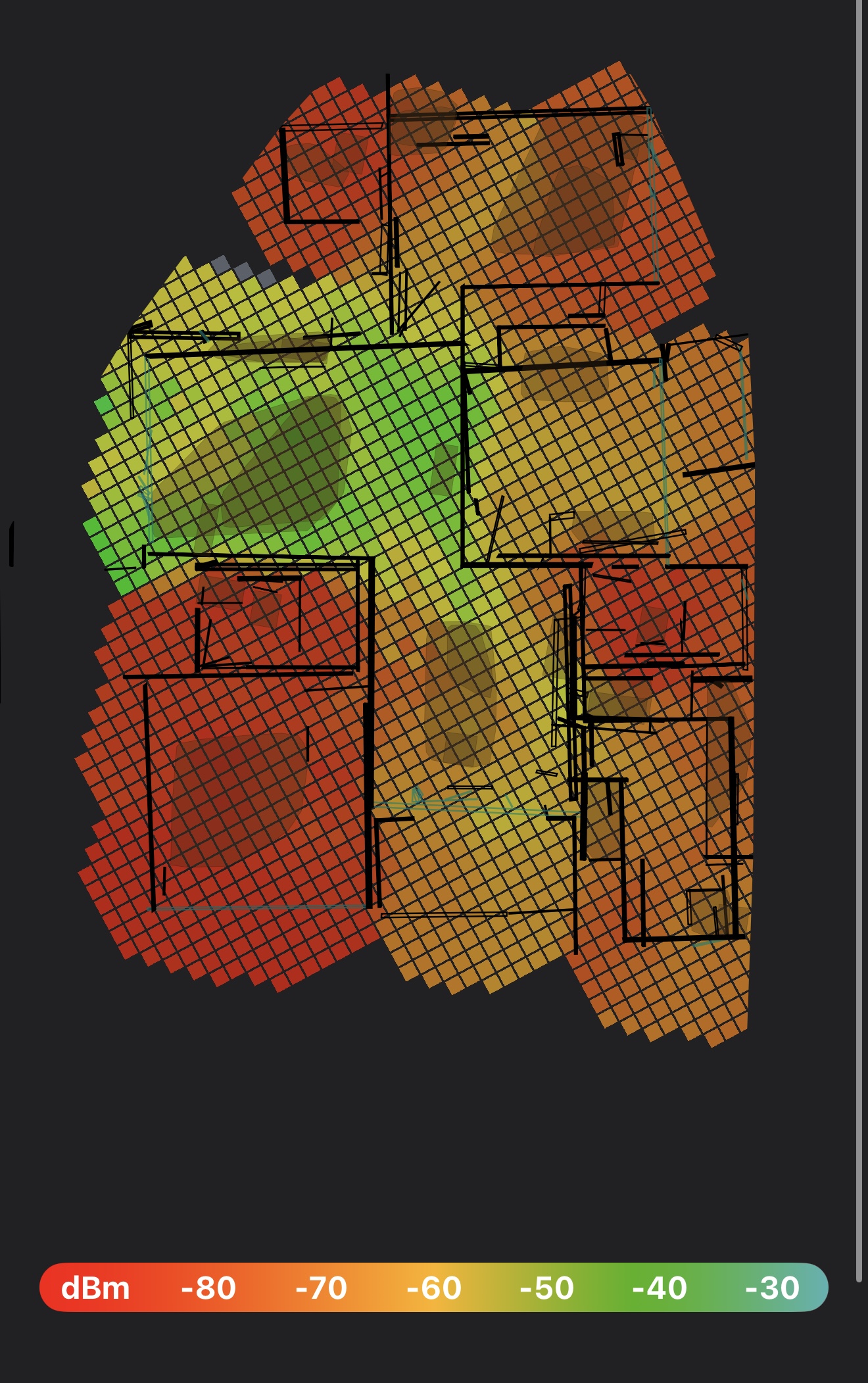
The green patch on the upper left is where the Express lives. Around -45 dBm there, which is great. Then look what happens as you move away from it. The middle of the house sits somewhere around -65 to -75, and the bottom left and the whole right edge drop past -80.
dBm is negative, and closer to zero is better. Around −50 is a strong, happy connection. Past −70 things get flaky, devices start dropping and reconnecting. Past −80 your phone still shows bars (which is the annoying part) but nothing actually loads properly.
So most of my house was in the “technically connected” band. And this is the thing I keep coming back to: this is exactly the failure that makes people think their smart home is broken. The automation isn’t broken. The signal underneath it is.
What I bought
Two things.
A Ubiquiti PoE Switch 8 Lite, which is the boring one and also the important one. Eight ports, PoE on it, managed from the same UniFi app I already had. The reason it matters isn’t the switch itself, it’s that PoE means the access point gets power and data down one cable. Which means I can put an AP where it should go instead of where there happens to be a plug socket. That one constraint disappearing changes the entire placement conversation.
And two UniFi In-Wall APs. I went in-wall deliberately (I didn’t want a ceiling puck or another plastic box sitting on a shelf). It goes in where a wall plate was and basically vanishes, plus you get a few wired ports at that spot as a bonus.
I also ran ethernet out to the in-wall locations rather than letting the APs uplink wirelessly back to the Express. That’s worth saying out loud because it’s easy to skip, and it matters more than it sounds like it should. I’ll come back to why at the end.
What actually changed
Here’s the part worth being clear about: I’ve only put up one of the two In-Wall APs so far. Just the one, in a room on the left side of the plan.
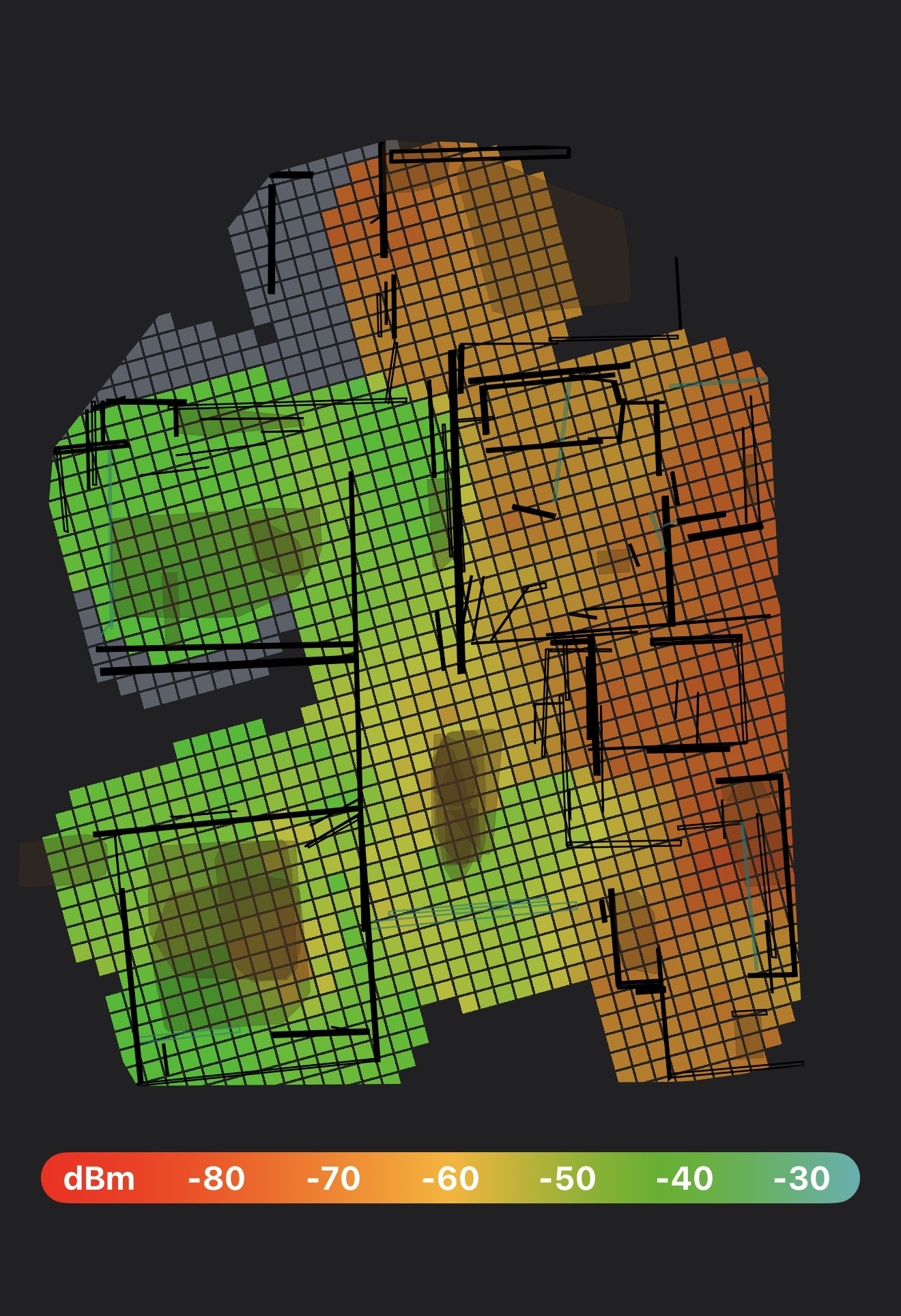
Same survey, same walls, same everything. The left half of the house went from -80 red to a solid -40 to -50 green. The bottom left, which was basically a dead zone, is now one of the strongest parts of the house. The middle corridor, which used to be where everything fell apart as you walked through it, is completely usable now.
That’s from one access point in the right spot, wired back to the switch, which is more than I expected out of a single unit.
But the right side of the house is still sitting in the -70s. Better than the -80s it was, but still the weak half. More on that at the end, because it changes how you should read that second map.
Was it worth it
Yeah, easily. If you’re running one all-in-one unit and you’ve been quietly blaming your devices for being unreliable, it’s probably not your devices. And watching the bottom left corner go from dead zone to the strongest part of the house is the best before-and-after this whole project has produced so far.
What I’d tell anyone about to buy a mesh kit
- Survey first, buy second. I nearly bought a mesh kit. The heatmap is what talked me out of it. What I actually had was a placement problem, and mesh would’ve solved it badly and for more money.
- The switch is the unlock, not the AP. The access point is the visible bit you get excited about. The PoE switch is the thing that made good placement possible in the first place.
- Run the cable. This is the one I nearly didn’t bother with. An AP that uplinks over Wi-Fi is spending its radio time talking back to the router, and that’s time it isn’t spending on your actual devices. Wire it to the switch and all of it goes to you instead. Some of why one AP moved the map this much is just that it isn’t meshing.
- Fix the boring layer first. Every “why didn’t the light turn on” complaint eventually traces down to something below the automation.
One AP in
If you just glanced at that second heatmap you’d probably think the job was done. It isn’t. What you’re looking at is a half-finished network that happens to look good in the half I’ve finished. The second In-Wall AP goes up over the next couple of months, aimed at the right edge that’s still living in the -70s, and I’ll walk the house again when it’s in. Same app, same floor plan, third map.